


Download Game Speed Changer – game speed changer, speed up game, game speed mod, game speed tool, game speed utility
Overview
Game Speed Changer is a specialized mobile utility designed for gaming enthusiasts seeking greater control over their gameplay tempo. The app enables users to adjust game speed across an extensive range—from 0.01 times the original pace to 256 times faster—offering unprecedented flexibility in how games are experienced. This functionality is particularly valuable for players aiming to speed-run levels, bypass repetitive segments, or engage in meticulous practice of complex maneuvers. The app caters to both casual gamers and competitive players who want to tailor their sessions to specific goals, such as mastering difficult challenges or optimizing strategies.
As a productivity tool within the gaming ecosystem, Game Speed Changer serves as a performance enhancer rather than a game itself. It operates in the background, modifying the execution speed of supported games without altering core game files. The developer, Game Speed Changer, has positioned the app as a utility that empowers users with autonomy over their gaming rhythm. Real-world applications include accelerating through tutorial phases, analyzing enemy patterns in slow motion, or testing different gameplay approaches under varied speed conditions. While the developer did not provide additional technical details about compatibility or system integration, the app's core purpose remains clear: to give players unprecedented control over game pacing.
Key Features & Functionality
- Variable Speed Control: Users can accelerate gameplay up to 256 times the normal speed, ideal for quickly progressing through repetitive or time-consuming sections of a game.
- Slow Motion Mastery: The ability to reduce game speed to as low as 0.01x allows for precise observation and execution, particularly useful during challenging sequences or skill development.
- Intuitive Interface: The latest version features a streamlined layout designed for ease of access and quick adjustments, ensuring both new and experienced users can navigate settings without difficulty.
- On-the-Fly Adjustments: Speed settings can be modified during gameplay, enabling dynamic adaptation to changing scenarios without requiring game restarts.
- Customizable Experience: The app supports personalized playstyles, allowing users to switch between fast-paced runs and deliberate, methodical sessions based on their preferences.
For example, a player attempting a speed-run can increase the speed to bypass early levels, while another user practicing a difficult boss fight may slow down the game to study attack patterns. The flexibility of real-time adjustments enhances both efficiency and mastery, making the app a valuable addition to a gamer’s toolkit. Although the developer did not specify supported game types or technical implementation methods, the described features suggest broad compatibility with Android-based games.
Interface, UX & Performance
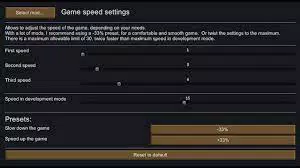
The user interface of Game Speed Changer is described as streamlined and intuitive, with a layout focused on accessibility and quick navigation. The design emphasizes functionality, allowing users to adjust speed settings with minimal interaction. The app likely employs a simple slider or numeric input for speed selection, enabling precise control across the full range from 0.01x to 256x.
Navigation appears to be linear and focused, minimizing distractions and ensuring users can access core features without unnecessary steps.
Performance is expected to be responsive, given the app’s lightweight nature—only 15.8 MB in size. Although the developer did not list formal performance metrics or device-specific benchmarks, the compact size suggests efficient resource usage. The app is designed to operate in the background, adjusting game speed without significant impact on device performance.
Stability during extended use and compatibility across various Android devices were not explicitly detailed. However, the minimal file size and focus on core functionality indicate a low risk of crashes or lag. Users can expect smooth transitions between speed settings, though actual responsiveness may vary depending on individual device capabilities.
Platform Compatibility & Technical Requirements
Game Speed Changer is available exclusively on the Android platform. The current version is 1.1, with a file size of 15.8 MB. The app is free to download and install, with no upfront cost to users.
Specific minimum OS requirements were not listed by the developer, nor were details about supported device types or hardware specifications. The developer did not specify whether the app requires root access or special permissions to function. Compatibility information was not fully disclosed, so users should exercise caution when installing on older or less common Android devices.
The release date of April 5, 2024, indicates that this is a relatively recent update, suggesting ongoing development and support.
Pros and Cons
Pros
- Offers extreme speed control, from 0.01x to 256x, providing unmatched flexibility in gameplay pacing.
- Intuitive interface designed for quick access and ease of use across skill levels.
- Lightweight at only 15.8 MB, minimizing storage impact.
- Free to download and use, making it accessible to a wide audience.
- Supports real-time adjustments during gameplay, enhancing adaptability.
Cons
- Specific compatibility details, including supported games and OS versions, were not provided.
- Developer did not disclose whether root access or special permissions are required.
- Performance on older or low-end Android devices remains unverified.
- No information on update frequency or long-term maintenance.
- Limited transparency regarding technical implementation and security protocols.
FAQ
Is Game Speed Changer safe to use on my Android device?
The app is free and has a small file size, suggesting it is designed to be lightweight. However, the developer did not disclose security measures or permission requirements. Users should ensure they download the app from trusted sources.
Can I use Game Speed Changer on any Android game?
While the app is designed for gaming, specific game compatibility was not listed. Performance may vary depending on the game’s architecture and device configuration.
Do I need to root my device to use this app?
The developer did not specify whether root access is required. Without official confirmation, it is advisable to assume the app may function without root privileges.
How often is Game Speed Changer updated?
The app was released on April 5, 2024. No information was provided about update frequency or future development plans.
Is Game Speed Changer available on iOS?
Currently, the app is only available on Android. There is no indication of an iOS version in the provided data.
Final Thoughts
Game Speed Changer stands out as a unique utility in the mobile gaming space, offering a rare level of control over gameplay speed. Its ability to accelerate games up to 256 times or slow them to 0.01x makes it a powerful tool for both speed-runners and players focused on mastery. The intuitive interface and lightweight design enhance usability, while the free price point increases accessibility.
Although the developer did not provide detailed compatibility or technical specifications, the app’s core functionality is clear and valuable. It is particularly beneficial for gamers who value customization, efficiency, and precision in their sessions. For those seeking to optimize their gameplay experience, this tool delivers tangible benefits.
Download Game Speed Changer now.


